Export Flow Code
Description
This custom step exports a complete collection of SAS Studio Flows from a directory in SAS Content or physical location as SAS code to a specified physical file system location.
The generated code can be used in a CI/CD pipeline and/or versioning environment.
Prerequisites
The custom step requires Python to be installed and accessible in your SAS Viya environment in order to extract the code from the response file and write it to a .sas file.
Documentation used
The following documentation is used while creating the custom step:
SAS Viya version support
This custom step is created and tested in Viya 4, Stable 2025.12
User interface
Tab: Options
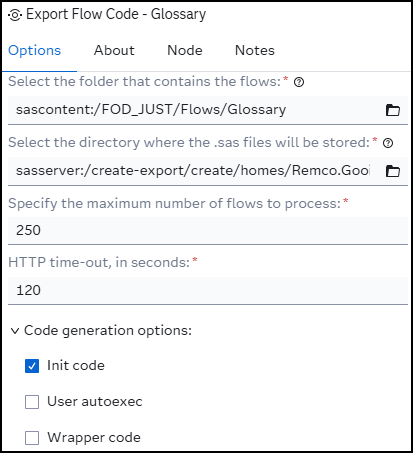
- Select the folder that contains the flows: Here you need to select the SAS content or physical directory, containing your SAS Studio flows.
- Select the directory where the .sas files will be stored: Select the physical location to write the .sas files to. Note that SAS content directories are not supported for this option.
- Specify the maximum number of flows to process: Specify the maximum number of flows that can be processed within a directory. The default value is 250.
- HTTP time-out, in seconds: The numbers of seconds SAS waits for the HTTP procedure to return with a response.
- Init code: If selected, it will include the initialization code for the SAS Studio session. The default value is unchecked.
- User autoexec: If selected, it will include the autoexec code. Please be aware that this option only works, and becomes available, when the Init code option is checked. The default value is unchecked.
- Wrapper code: If selected, it will include the wrapper code for the SAS Studio request. The default value is unchecked.
Tab: About
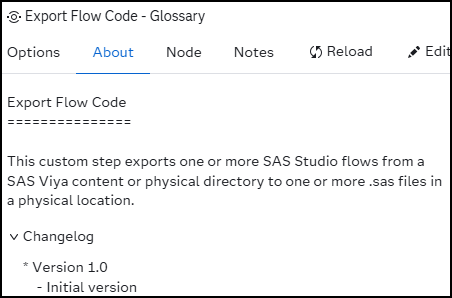
Usage
Download the .step file, upload it into your environment and start using it.
Example flow:
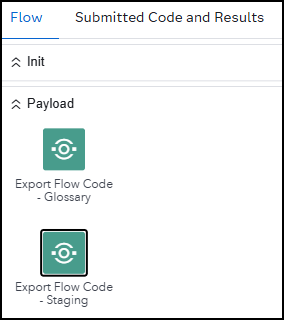
Note that:
- This example flow generates .sas files grouped by data layer.
- The custom step doesn't process sub-directories.
- Processing SAS Studio Flows stored on the file system can take a bit longer.
- The time-out value for the PROC HTTP might be overruled by the time-out set by the REST API.
- When code, for whatever reason, can't be generated, the custom step will make that known by a line in the log file simular to 'ERROR: Unable to generated code for ...' and by retrieving the error message from the response file.
- It will check if the target directory exists. In case it doesn't, the custom step stops the process and will write the line 'ERROR: The target directory does not exist'. in the log.
- The resulting file name is the same the original flow name, where the .flw extension is replaced with the .sas extenion. (i.e: flow_name.flw => flow_name.sas).
- When you store passwords or other sensitive information in your autoexec and you have selected the User autoexec option, this sensitive information WILL become visible in the resulting .sas code!
Custom step messages
| # | Step message | Reason | Result |
|---|---|---|---|
| 1 | ERROR: unable to open compute directory. | The system is unable to get access to the physical directory where the flows are stored. | Processing the flow(s) stops. |
| 2 | ERROR: Unable to generated code for &contentDirectory. /&flowName | The REST API returned another status then 200. The custom steps tries to read the actual reason from the response file for now being able to generate the .sas code. | Processing the current flow stops |
| 3 | ERROR: Unable to retrieve the error message. | The custom step is unable to retrieve the reason for status other than 200 from the response file. | Processing the current flow stops. |
| 4 | ERROR: No error message response file received. | The status is other then 200 and there's no response file. | Processing the current flow stops. |
| 5 | ERROR: The custom step only supports physical directories to write to .sas file to. | The end-user has selected a SAS content directory for the .SAS file to be written to. This is not supported | No processing is taking place. |
| 6 | ERROR: The file " + responseLocation + " does not exist. | This is a Python message, telling that it can't find the response file containing the .SAS code. | No code for the specified flow is generated. |
| 7 | Exception caught: <ERROR MESSAGE> | This is an unhandled Python error message. | No code for the specified flow is generated. |
| 8 | ERROR: Unable to retrieve content directory members. | The custom step didn't receive the response file containing the flows | No flow(s) can/will be processed. |
| 9 | ERROR: Unable to retrieve content directory. | The custom step didn't receive the response file containing content directory information. | No flow(s) can/will be processed. |
| 10 | WARNING: No flow(s) to process. | The end-user selected a directory not containing any flows or something went not as planned resulting in the situation that there are no flows to process. | No flow(s) can/will be processed. |
| 11 | ERROR: The target directory does not exist. | The target directory where the .sas files need to be written to doesn't exist (anymore) | No flow(s) can/will be processed. |
Known differences
There are some difference between the code generated by SAS Studio and the REST API.
- The system generated macro variables flow_place and flow_location are empty for the .sas code generated by the REST API.
- The SAS work tables have a slightly different name. The name has an additional '001' in the name when SAS Studio generated the code. Example: _flwa08d8290d67d11f0_0_0_2 vs. _flw001a08d8290d67d11f0_0_0_2.
Change log
Version 1.0 (17MAR2026):
- First release